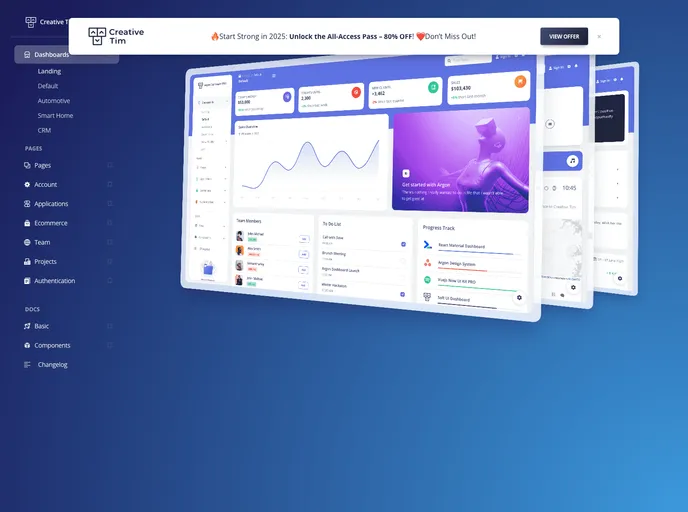
A beautiful Premium Dashboard for Bootstrap 5.
Overview:
Argon Dashboard 2 PRO by Creative Tim is a premium Bootstrap 5 Dashboard that is designed for those who prefer bold elements and beautiful websites. It is a complex and innovative dashboard that offers countless design elements, blocks, and fully coded pages to help users create stunning websites and web apps. With over 300 frontend individual elements, like buttons, inputs, navbars, cards, alerts, and more, Argon Dashboard 2 PRO provides users with the freedom to choose and combine these elements. It also comes with prebuilt design blocks, making the development process seamless and easy.
Features:
- Complex and Innovative Design: Argon Dashboard 2 PRO is designed to be visually appealing and features bold elements.
- Wide Range of Design Elements: There are over 300 frontend individual elements available, including buttons, inputs, navbars, cards, and alerts.
- Prebuilt Design Blocks: The dashboard comes with prebuilt design blocks, making it easy to quickly set up the basic structure for web projects.
- Fully Coded Pages: Argon Dashboard 2 PRO includes fully coded pages for various purposes, such as Sign In and Profile.
- Customizable Color Variations: All components in the dashboard can be easily customized in terms of color variations using SASS files and classes.
- Comprehensive Documentation: Each element in Argon Dashboard 2 PRO is well presented in detailed documentation, making it easy for developers to understand and implement.
- Example Pages for Inspiration: The dashboard provides pre-built example pages, allowing users to get inspiration or showcase directly to clients.
- Third-Party Libraries: Argon Dashboard 2 PRO utilizes several awesome open-source libraries from other developers to enhance its functionality and feature set.
Installation:
To install Argon Dashboard 2 PRO, follow these steps:
- Download the Argon Dashboard 2 PRO package from the official website.
- Extract the downloaded ZIP file to your desired project directory.
- Open your project’s HTML file where you want to use the dashboard.
- Insert the necessary CSS and JavaScript files into your HTML file. You can find these files in the extracted package under the “assets” folder.
- Make sure to include the required dependencies mentioned in the documentation, such as Bootstrap and Font Awesome.
- Customize the color variations and styling by modifying the SASS files and classes.
- Start using the dashboard’s components and design blocks to build your web project.
Summary:
Argon Dashboard 2 PRO is a feature-rich Bootstrap 5 Dashboard that offers a wide range of design elements and prebuilt design blocks. It is designed for users who prefer bold and visually appealing websites. With comprehensive documentation and example pages, developers can quickly and easily implement the dashboard into their projects. Overall, Argon Dashboard 2 PRO provides a seamless development experience and enables users to create stunning websites and web apps efficiently.