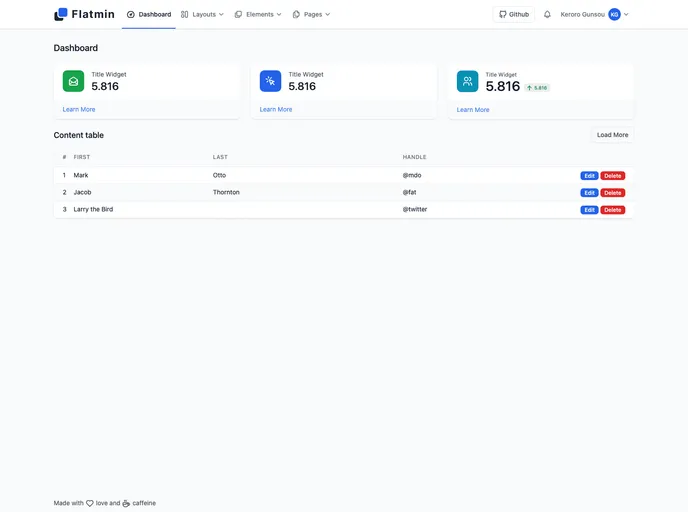
Overview:
Flatmin is a sleek and modern bootstrap dashboard template designed to provide a user-friendly experience for managing data and visualizing analytics. With its clean and intuitive interface, this template is suitable for creating a variety of dashboard applications.
Features:
- Clean and modern design: Flatmin offers a visually appealing dashboard interface with a minimalist and modern design.
- Responsive layout: The template is fully responsive, ensuring that the dashboard can be accessed and utilized on any device, including desktops, tablets, and mobile phones.
- Data visualization: Flatmin provides various charts and graphs to help users effectively visualize data, making it easier to understand and analyze trends and patterns.
- Easy customization: With its well-organized and commented code, Flatmin allows for easy customization. Users can easily modify the template to suit their specific needs and branding.
Installation:
Installing the Flatmin theme is a straightforward process. Follow the steps below to get started:
- Download the Flatmin theme: Visit the official Flatmin website and download the theme package.
- Extract the files: After downloading the package, extract the files to your preferred location on your computer.
- Integrate the theme: Depending on your project, you can integrate the Flatmin theme in different ways. For example, if you are using a web framework like Angular or React, you can import the theme files into your project. Alternatively, you can simply include the CSS and JavaScript files within your HTML code.
- Customize the theme: To customize the theme, locate the CSS file and make changes to the styles as needed. Additionally, modify the HTML structure and content to match your application’s requirements.
That’s it! You have successfully installed and customized the Flatmin theme for your dashboard application.
Summary:
Flatmin is a stylish and user-friendly bootstrap dashboard template that offers a clean and modern design, responsive layout, and various data visualization options. Installing and customizing the theme is a straightforward process, making it a great choice for creating professional dashboard applications.