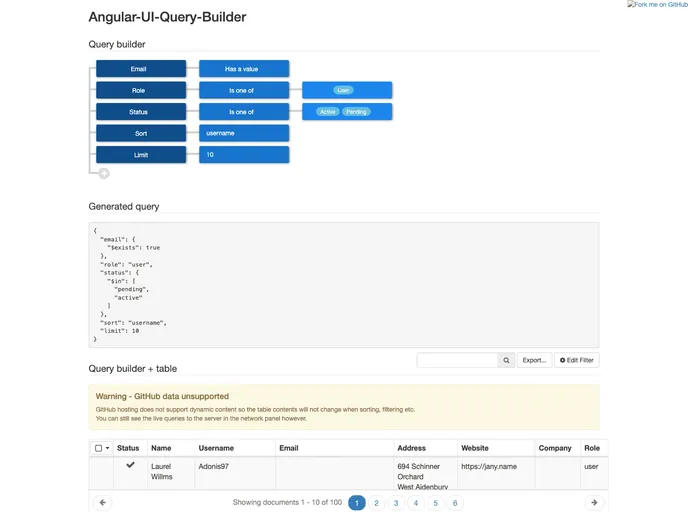
MongoDB format query-builder UI component for Angular
The angular-ui-query-builder is a powerful MongoDB format query-builder UI component specifically designed for Angular applications. It provides a seamless way to create and modify MongoDB queries interactively, enhancing the developer’s experience by allowing easy construction and management of complex queries through a user-friendly interface. This component not only simplifies query editing but also extends HTML table functionalities, enabling features like column sorting and filtering directly tied to the constructed queries.
Incorporating this component into your Angular project is straightforward, involving basic installation of scripts and CSS, along with simple directives to enhance your tables’ capabilities. With built-in support for both query management and table enhancements, this dual-purpose component stands out as an essential tool for developers working with MongoDB.
Interactive UI Element: Offers a user-friendly interface for editing MongoDB queries, making complex query building intuitive and accessible.
HTML Table Enhancements: Extends standard HTML tables with advanced features such as column sorting and filtering based on the constructed MongoDB query.
NPM Installation: Easily installable via NPM, ensuring a quick setup process and integration into your existing build chain.
Query Object Linking: Link a query object directly to the ui-query-builder directive, enabling real-time updates and compatibility with MongoDB.
Table Management Directives: Utilize the qb-table and qb-col directives to transform any HTML table into a dynamic, query-driven component with pagination and sorting features.
Sticky Header and Footer: Configure the table to retain its headers and footers on-screen during scrolling for improved usability.
Demo Availability: A comprehensive demo is provided, showcasing how to leverage the various features of the component effectively.

